

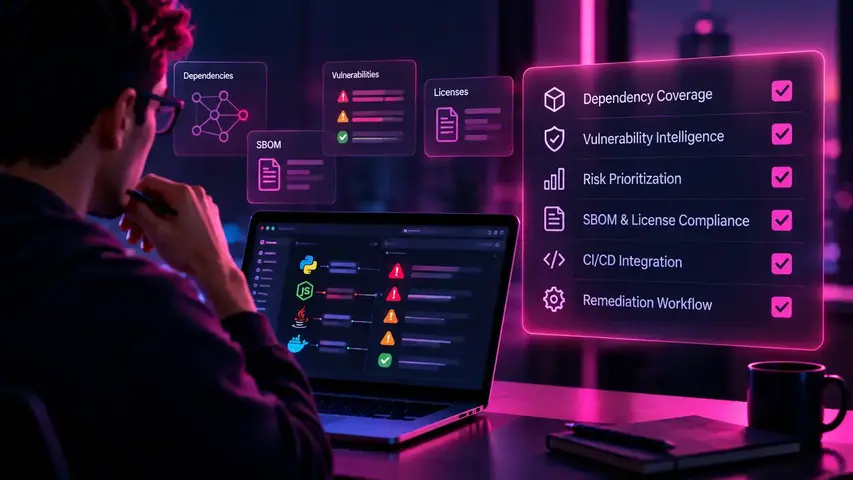
To evaluate software composition analysis tools, start with dependency coverage, vulnerability intelligence, SBOM and license support, CI/CD integration, and remediation workflows. Shortlist products based on your application stack, then run the same controlled tests across each platform. The right tool should identify relevant dependency risks, provide actionable evidence, and fit the way your developers resolve security findings.
Related resources:
Explore the agentic AI cybersecurity platform
Compare agentic security harnesses
This guide gives you a shortlist method, a proof-of-concept to run on your own repositories, a weighted scorecard, and a checklist of vendor questions. It does not rank products. A 2020 Linux Foundation guide to evaluating SCA tools notes there is no standard method for comparing them, so test candidates against your own code.
What Should a Software Composition Analysis Tool Actually Do?
A software composition analysis (SCA) tool should inventory the third-party components in your software, match them against known vulnerability data, and report enough detail for your team to act on the result. Everything beyond that baseline, including prioritization, SBOM management, license policy, and remediation, is where products diverge.
The OWASP Developer Guide describes SCA as the way to identify third-party dependencies, and an SBOM (software bill of materials) as a record of each dependency's version, license, source, where it is used, and maintenance status. With that record, teams can quickly find which applications are affected by a specific CVE. OWASP's own Dependency-Check shows the baseline: it identifies a project's dependencies and links them to associated CVE entries.
Buyers should separate identifying risk from managing its resolution. A scanner that lists vulnerable components has done the first job. Deciding which findings matter, who owns them, and whether the fix worked is a separate job, and it is where most team time goes.
Which Capabilities Matter Most When Comparing SCA Tools?
Six capabilities separate SCA tools in practice: dependency coverage, finding quality, risk context, SBOM and license governance, developer workflow fit, and remediation with verification. Weigh each against your own stack and require test evidence.
Dependency Discovery and Ecosystem Coverage
Coverage means the tool finds the components you actually ship, in the formats you actually build. Check supported languages and package managers, and whether the tool reads lockfiles or only manifests. A manifest usually declares version ranges, while a lockfile records the versions actually resolved, so a manifest-only tool has to infer the resolved tree and can get it wrong. Also check build artifacts, container images, and vendored or binary components if you use them.
Ask what the tool reports when it cannot resolve part of a dependency tree. NTIA's SBOM guidance expects authors to identify "known unknowns" rather than imply a complete graph, and an SCA tool should be equally candid. Request results on your own repositories, not a vendor demo project.
Vulnerability Intelligence and Finding Quality
Finding quality depends on the advisory sources a tool uses and how accurately it maps a component to an advisory. That mapping is an inference step. OWASP Dependency-Check, for example, collects evidence about each dependency to identify a Common Platform Enumeration (CPE) identifier, then reports the associated CVEs using NVD data feeds. NTIA's SBOM minimum elements report calls software identification a hard problem across ecosystems, which is why component matching deserves its own test.
Watch for duplicate findings, stale findings that persist after a fix, ambiguous matches where a library name exists in several ecosystems, and wrong version-range handling. Ask each vendor which advisory sources it uses and how quickly new disclosures appear, then measure false positives and misses against your own fixture.
Risk Prioritization and Reachability Context
Severity alone is insufficient because a CVSS score describes a vulnerability in the abstract, not whether your application calls the vulnerable code. The NTIA report makes the same point about dependencies: not every vulnerability in a component creates risk for the software that uses it, particularly among transitive dependencies, and the vulnerable code may not be reachable in the execution path.
Evaluate whether a tool offers reachability context, exploitation signals such as EPSS scores, and exposure information, and whether it reports uncertainty instead of forcing a yes or no. OWASP Dependency-Track, for instance, prioritizes findings with the Exploit Prediction Scoring System. Ask for a sample finding that shows the call path, which languages reachability covers, and what happens when it cannot decide.
Treat reachability as one criterion, not the whole decision: it is evidence of relevance, not proof of exploitability. Our guide to SCA reachability analysis covers how a dependency finding is traced to a vulnerable function.
SBOM Generation, License Compliance and Governance
Evaluate whether the tool exports a machine-readable SBOM in the format your consumers require, keeps it current, and enforces license policy with an audit trail. NIST's software supply chain guidance defines an SBOM as a formal record of the components used to build software and points federal procurement to the NTIA minimum elements: data fields, automation support, and practices and processes. The NTIA report lists SPDX, CycloneDX, and SWID tags as the interoperable formats.
Turn that into tests. Export an SBOM for each pilot repository and check the required data fields: supplier, component name, version, other unique identifiers, dependency relationships, author, and timestamp. Check whether a new SBOM is generated for each build and from what source, since NTIA notes an SBOM created from source can differ from one created at build time. Then check license policy rules, ownership mapping, and audit exports.
If you ship software to customers, ask whether the tool can consume or publish Vulnerability Exploitability eXchange (VEX) statements, which communicate that a vulnerability does not affect a product. NTIA also cautions that an SBOM will not solve all software security problems. It is an inventory layer, not a risk verdict.
Developer Workflow and CI/CD Integration
Integration quality determines whether findings reach the right developer at the right time. Test pull-request feedback, pipeline gates, API access, alert routing, deduplication across repositories and branches, and ownership mapping. Prefer gates you can configure by condition over a single pass-or-fail switch, so a low-risk finding does not block a release.
Basic CI feedback is table stakes: even open-source Dependency-Check offers a command-line interface, Maven and Gradle plugins, and integrations with Jenkins, GitHub Actions, and Azure DevOps. Products differ in what happens after the alert: who receives it, whether it arrives once, and whether it carries enough context to act on.
Remediation and Fix Verification
Remediation support ranges from report-only to pull requests that apply upgrades, so do not assume candidates behave alike. Evaluate whether the product recommends the smallest upgrade that resolves the vulnerability, surfaces compatibility information such as breaking changes, opens dependency-change pull requests your build and tests can validate, offers approval controls, and shows evidence that the vulnerability is resolved once the fixed version is deployed.
Transitive dependencies add a wrinkle: you often cannot upgrade them directly, so the fix may require upgrading a parent package or overriding the resolved version. Test each vendor's handling of a real transitive finding.
How Should an AppSec Team Test SCA Tools Before Purchasing?
Run the same controlled proof-of-concept (POC) on every shortlisted tool: identical repository revisions, a pre-built expected inventory, a known-vulnerable fixture, and one shared worksheet that records results and review effort.
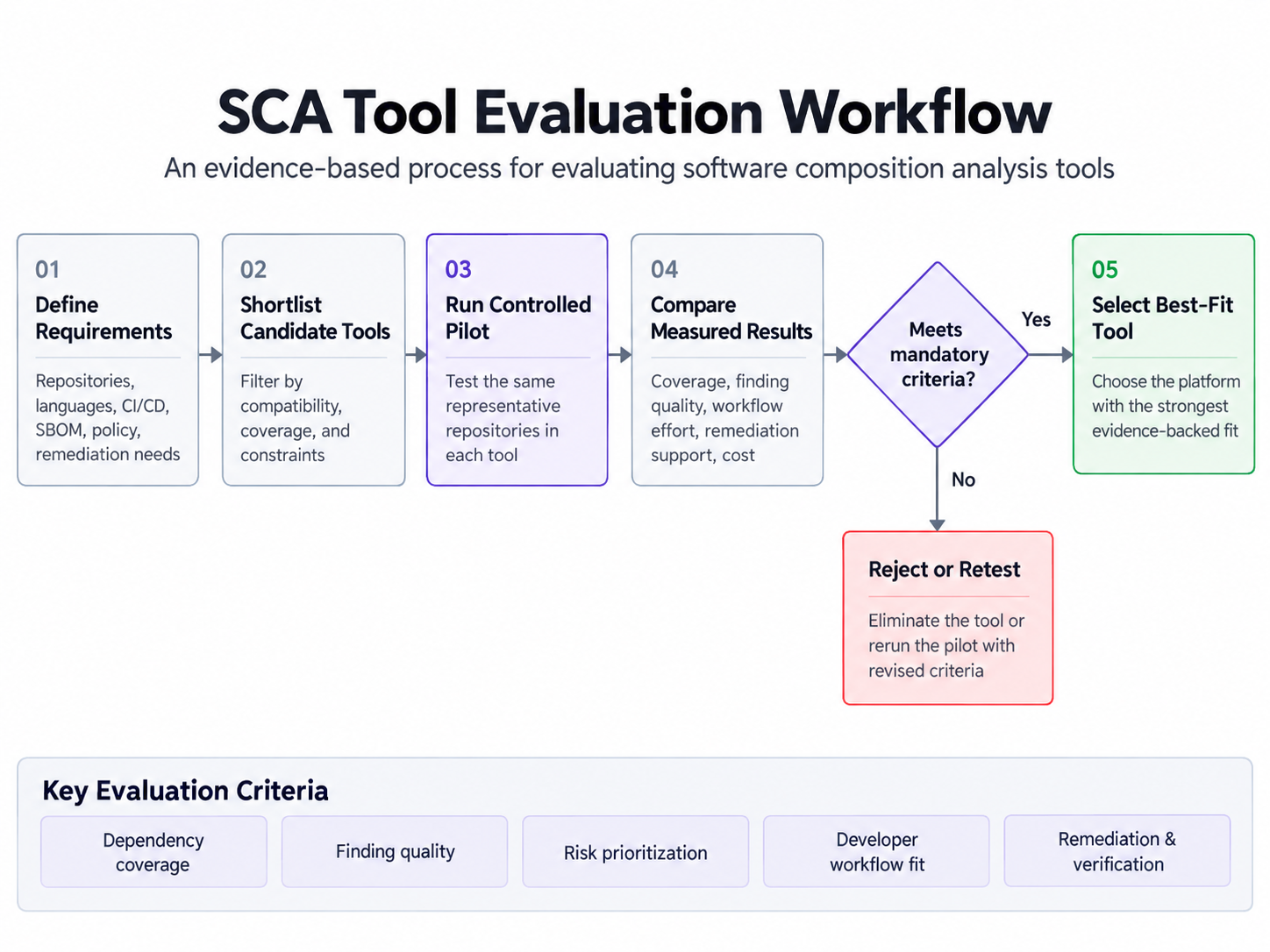
- Select two representative repositories with different ecosystems, such as a Node.js service and a Java service, plus any container or build-artifact path you rely on.
- Prepare an expected inventory first. Generate each dependency tree with the package manager, for example npm ls --all or mvn dependency:tree, and review it by hand so your answer key does not come from a vendor.
- Include an approved test fixture: a branch pinning a library version with a known vulnerability, agreed with the repository owner and never merged.
- Run every tool on the same revisions, with default settings first and tuned settings second, noting the configuration effort.
- Compare discovered components with the expected inventory, recording missing components, wrong versions, and findings with no clear basis.
- Check workflow delivery: each alert should reach the right repository, owner, and channel without duplicates.
- Evaluate proposed upgrades on a branch, run your normal build and test suite, and record failures.
- Document unsupported cases, manual steps, and review hours. Time spent interpreting results is part of a tool's cost.
Record outcomes in a worksheet like the one below. The rows are an illustrative template, not results from any vendor test.
SCA Tool Evaluation Scorecard: How to Compare Your Shortlist
A weighted scorecard converts POC evidence into a comparable number. Rate each dimension from 1 to 5, multiply by its weight, divide by 5, and add the results for a total out of 100. Rate only what you observed in the POC or can document from vendor evidence.
Use this rating guide: 1 means the tool failed the test or no evidence exists, 3 means it meets the requirement with manual effort or documented gaps, and 5 means it meets the requirement with clear evidence and little effort.
Here is a hypothetical example, not a benchmark of real products. Tool A rates 4, 3, 4, 3, 5, 2, 4, and 3 across the eight dimensions in table order, which totals 71. Tool B rates 5, 4, 2, 5, 3, 4, 3, and 4, which totals 76. Tool B wins on points, but suppose your team set prioritization and reachability context as a must-have with a minimum rating of 3. Tool B is then disqualified despite its higher total. Define must-have requirements before scoring, such as a required ecosystem, SBOM format, or data-residency constraint; a missing critical requirement should eliminate a product regardless of its total.
The weights are a proposed starting point, not an industry standard. Adjust them to your situation:
- Regulated enterprise: raise SBOM and license governance and remediation verification, since auditability carries more weight.
- Small development team: raise developer workflow and remediation, and lower governance and operational overhead.
- Heavy open-source governance: raise dependency coverage and SBOM and license governance.
Which Type of SCA Solution Fits Your Organization?
Match the solution category to your constraints before comparing individual products.
Two OWASP projects illustrate the range. Dependency-Check is a command-line SCA scanner that matches dependencies to known vulnerabilities. Dependency-Track is an SBOM-driven component analysis platform that ingests CycloneDX data, tracks components across a portfolio, applies policy, and keeps an audit trail of triage decisions.
A standalone scanner is often sufficient with a limited number of repositories, one or two ecosystems, existing triage capacity, and light compliance obligations. Broader workflow support matters when finding volume outgrows manual triage, many teams own repositories, or auditors expect traceable decisions. Is an open-source scanner enough for enterprise AppSec? It can be, if your team is prepared to own upkeep, integrations, and triage workflow. The trade-off is usually operational.
Where Do SCA Tools End and Vulnerability Remediation Workflows Begin?
SCA tools discover and report vulnerable components. Investigating relevance, prioritizing work, coordinating a fix, obtaining developer review, and validating the result are separate stages that some platforms cover and others leave to your process. The stages are:
- Discover vulnerable components.
- Investigate their relevance to your application.
- Prioritize the work.
- Generate or coordinate the remediation.
- Obtain developer review and validate the result.
To judge fit with a broader AppSec process, check whether findings can leave the tool through an API, webhook, or export with stable identifiers, whether each finding carries the repository, file path, and dependency chain needed for ownership routing, and whether it records the evidence behind its priority.
This is where Amplify Console is relevant. Amplify's product page describes Console as an agentic security harness that integrates with the security tools a team already uses. It states that Console takes in alerts from any source and applies triage automation based on company priorities, uses a reachability engine to filter out findings that are not reachable or exploitable, and provides one-click remediations that developers can review and collaborate on. It positions itself as not another scanner. For the triage side of that process, see how Amplify approaches automated vulnerability triage workflows.
Support varies by tool and finding type, so confirm which SCA sources and finding types any orchestration layer ingests before you rely on it. Keep dedicated SCA capabilities, such as dependency inventory, SBOM generation, and license policy, wherever your requirements call for them.
Final Checklist Before Selecting a Software Composition Analysis Tool
Select the tool that demonstrates fit on your own repositories. Before you decide, confirm each of the following:
- Does the product cover our deployed technology stack, including less common ecosystems and build artifacts?
- Are the vulnerability findings accurate and supported by usable evidence?
- Can security teams understand how findings were prioritized?
- Does it meet our license and SBOM requirements?
- Does it fit our developer workflows and CI/CD pipelines?
- Can we verify remediation outcomes?
- Are its limitations and operating costs documented?
- Have we tested it on representative repositories?
Demonstrated fit across these questions is a better basis for a purchase than feature count or vendor rankings alone.
Frequently Asked Questions
What is the difference between SCA and SAST tools?
SCA analyzes the third-party and open-source components your application depends on, matching them against known vulnerabilities and license data. SAST analyzes the source code your team writes to find flaws in that code. They detect different classes of issues, so most programs eventually need both. For help deciding which to adopt first, see our guide to SAST versus SCA.
Are free SCA tools sufficient for enterprise applications?
Sometimes. Free and open-source SCA tools such as OWASP Dependency-Check can provide a solid detection baseline. Whether that is enough depends on dependency coverage across your stack, governance and SBOM requirements, available support, pipeline integration, and whether your team has the capacity to maintain the tooling and triage its output. Run the proof-of-concept above before deciding.
Should an SCA tool include reachability analysis?
It is a valuable prioritization context, because it separates vulnerable components that exist in your dependency tree from vulnerable code your application can actually call. It is not proof of exploitability, and it is not the only selection criterion. Weigh it alongside coverage, finding accuracy, SBOM needs, and workflow fit, and check how the tool reports cases it cannot resolve.
How do you measure whether an SCA tool is effective?
Track inventory coverage against your expected dependency list, finding accuracy including false positives and missed findings, time to triage, remediation throughput, developer workflow friction such as duplicate or misrouted alerts, and governance outputs such as SBOM completeness. Compare these measures before and after rollout instead of relying on raw finding counts.
Finding Vulnerable Dependencies Is Only the Beginning
Choosing an SCA tool establishes dependency visibility. The next challenge is deciding which findings deserve action and moving them toward safe, reviewable remediation. Amplify Console is built to add investigation, prioritization, and remediation workflows alongside the security tools you already use.
Subscribe to Amplify Weekly Blog Roundup
See What Experts Are Saying
BOOK A DEMO





.jpg?width=1200&height=1600&name=IMG-20210714-WA0000%20(1).jpg)
Frequently
Asked Questions
Have a
Questions?
Contact Us
Ready to
Get started?
Book A GUIDED DEMO
